
1.0 About this document
What this document sets out, and who PlanEase is for.
This document sets out the technical, integration and functional capabilities of PlanEase as at August 2026. Sections 2.0 to 4.0 state each capability as a numbered clause; section 5.0 restates them as a single listing.
PlanEase is a structured delivery environment for Queensland development approvals: the approval, the team, the evidence and the lodgement preparation are all connected to the same condition register. It is built for Queensland councils and EDQ processes.
It is used by developers, consultants, contractors and government, who work from the same shared register.
2.0 Technical
How the application is delivered, where data is held, and how access is controlled.
PE1Web application
PE1.1Browser access
PlanEase works in modern browsers. It is delivered as a hosted service.
PE1.2Installable app and mobile experience
PlanEase is installable as an app, with a dedicated mobile experience.
PE2Data
PE2.1Storage and backup
Core application data is protected by continuous point-in-time backup with a 35-day recovery window. Document storage keeps prior versions of files.
PE2.2Encryption
Data is encrypted in transit and at rest.
PE2.3Data residency: hosted in Australia
Customer project data is hosted in the AWS Sydney (Australia) region.
PE2.4Data separation
Project visibility is restricted to invited members. Documents are indexed per project, and authorisation is enforced on the server for every request.
PE3Security
PE3.1Authentication
Access to PlanEase requires an authenticated account. Users can sign in with email sign-in, or with single sign-on.
PE3.2Single sign on
Users can sign in with single sign-on through Microsoft Entra ID or Google, alongside email sign-in. Where an account already exists under the same email address, single sign-on connects to that account.
PE3.3Role based access
Authorisation is enforced on the server for every request, with a two-layer role model and project visibility restricted to invited members. Project members join with defined roles.
PE3.4Audit trail and activity timeline
The platform keeps a per-project timeline of actions and an application audit trail recording what changed, when and by whom.
PE3.5Security governance
Security controls are enforced by the platform rather than by process convention: authorisation on the server, encryption in transit and at rest, and a recorded audit trail. Requests for further security detail are answered directly at hello@planease.net.
Figure 1
The figure has three groups. On the left, the ways people reach PlanEase: a web browser, an installable app, and single sign-on with Microsoft Entra ID or Google. In the centre, the PlanEase platform, hosted in the AWS Sydney region. On the right, what the platform holds and emits: application data, document storage, integrated AI, and notifications. Connections run from each access surface into the platform, and from the platform out to each of the things it holds. Data and document storage is encrypted in transit and at rest.
3.0 Integration
The external systems PlanEase connects to.
PE4Integration
PE4.1Council records and automatic re-sync
PlanEase collects the application record and documents from the council's public portal and keeps them in sync automatically. Council register documents are re-synced automatically, and re-issued documents are presented side by side so the team can see exactly what changed.
PE4.2Microsoft 365 and Outlook mailbox connection
Organisations using Microsoft 365 can sign in with single sign-on through Microsoft Entra ID. An optional Outlook mailbox connection sends and files project email from your own address.
PE4.3Project email addresses
Each project has a dedicated email address, feeding the project timeline.
PE4.4Mapping and spatial context
Projects carry interactive site maps and, for supported councils, resolved zoning and overlays, presented as indicative, with the council's property report authoritative.
4.0 Functional
The functional modules, stated module by module.
PE5Project setup
PE5.1Project intake
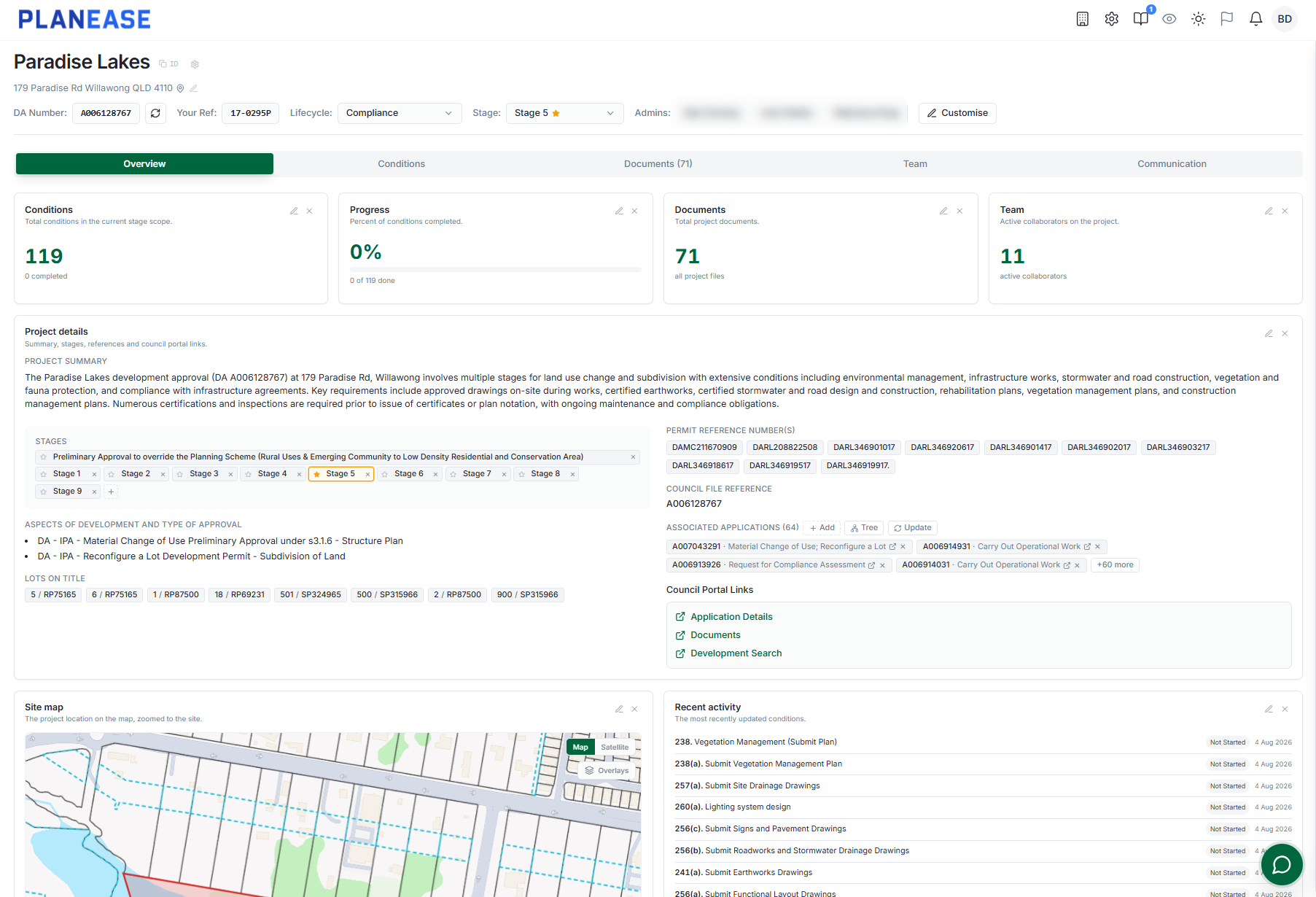
A guided intake creates the project from a council DA number.
PE5.2Council record collection
PlanEase collects the application record and documents from the council's public portal and keeps them in sync automatically.
PE5.3Condition extraction
Council-specific parsing, built for Queensland councils and EDQ processes, reads the decision notice and extracts every condition with its number, wording, headings and timing trigger, and handles amended and negotiated notices.
PE6Conditions
PE6.1Condition records
Every condition is a live record with status, timing, assignee and history.
PE6.2Register views
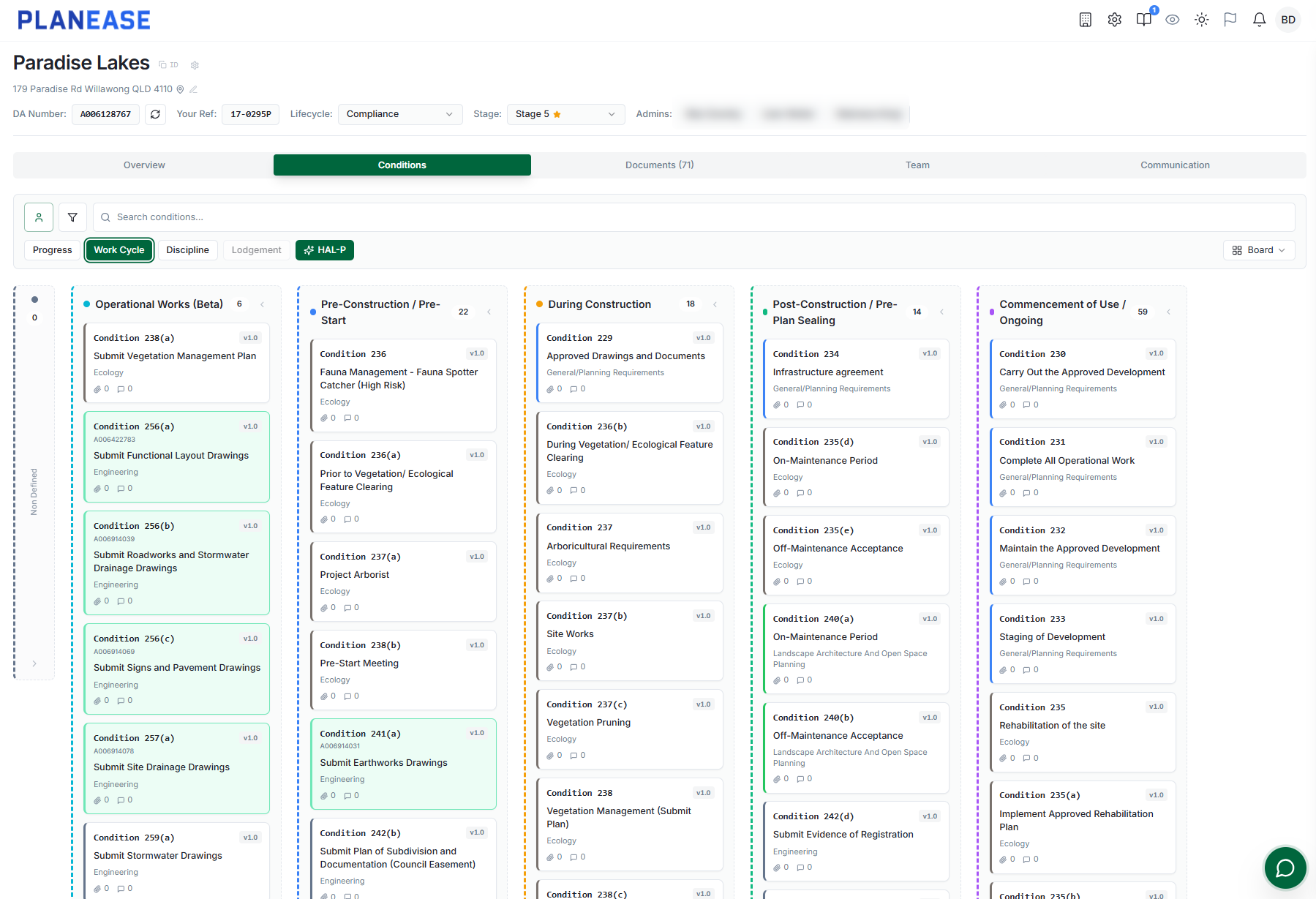
The register is worked through table, board and Gantt views, with bulk operations for real project scale.
PE6.3Delivery phase classification
Conditions are classified into delivery phases, including a dedicated operational works phase, so the register reflects how the work will actually be sequenced.
PE6.4Project stages
Project stages structure the register across a staged build-out.
PE6.5Condition versioning
PlanEase versions conditions across amended packages and new application numbers, and keeps the full history.
PE6.6Application family
An application family view assembles parent approvals and operational works applications mined from council registers into one connected picture.
PE7People and communication
PE7.1Members
Projects carry members, invitations and external members.
PE7.2Roles and permissions
Project members join with defined roles, enforced on the server for every request, and conditions are assigned to the people who will discharge them, so status, timing and ownership are visible in one place.
PE7.3Comments and references
Threaded comments with mentions and direct references to conditions, documents and applications keep the conversation attached to the work: the discussion that decides how a condition is met stays on the condition record.
PE7.4Notifications
Notifications reach the team in app, by email and by push.
PE7.5External participation
Tokenised response pages let external contributors answer a condition request directly, without a licence or a login.
PE8Documents
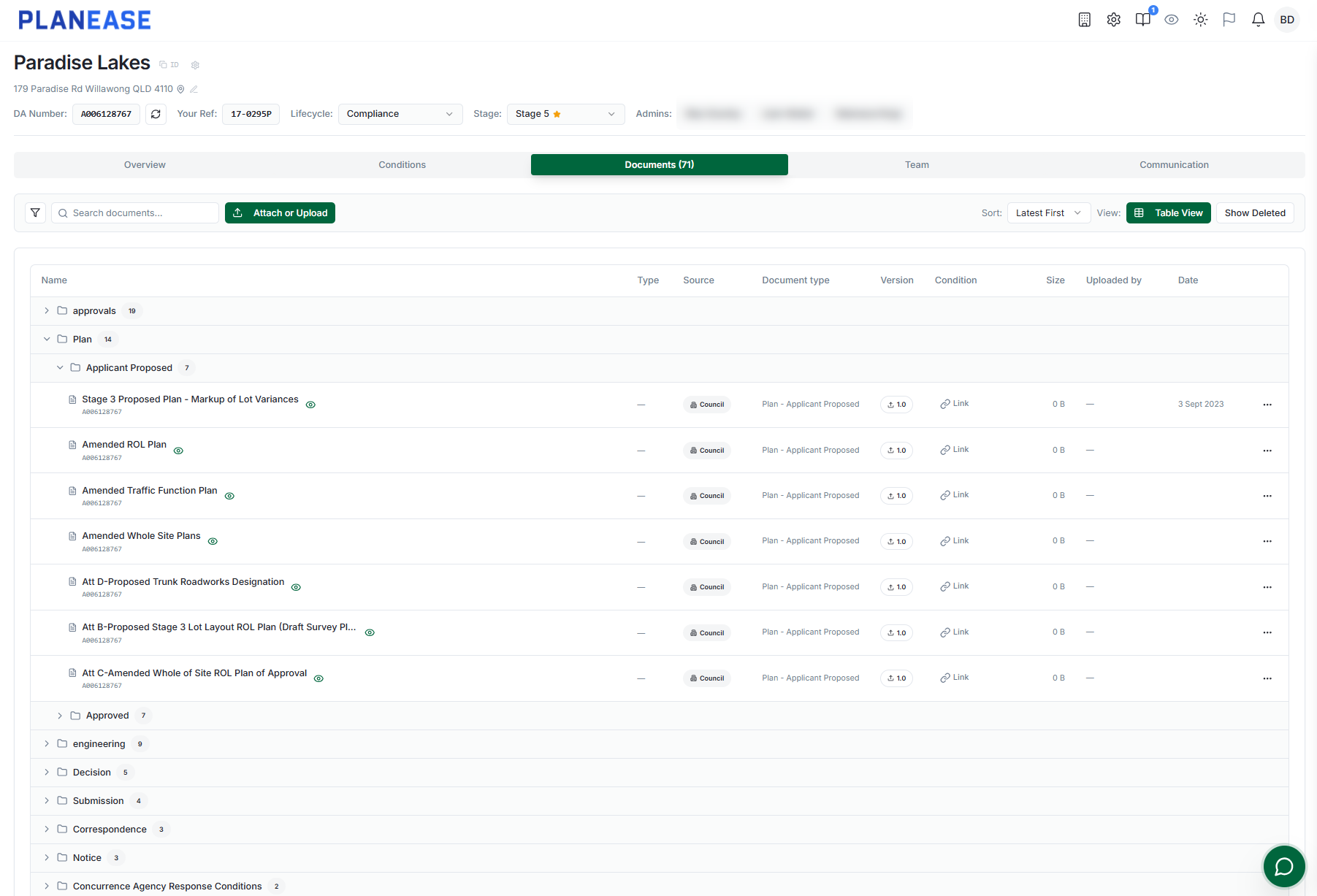
PE8.1Document management
Documents are uploaded once and held against the project.
PE8.2Versions and comparison
Documents are versioned, previewed and compared side by side.
PE8.3Condition evidence linking
Documents are linked to the conditions they discharge as the work happens: the integrated AI suggests the links, the team confirms them. Where a condition is discharged by a related application, that application's council register documents surface inside the condition.
PE8.4Classification on upload
Documents are classified on upload by integrated AI.
PE9Lodgement
PE9.1Packages
Lodgement packages assemble selected conditions and their evidence, with package statuses keeping the preparation itself visible.
PE9.2Submission reports
PlanEase generates a condition-by-condition submission report and a bundled document set. The output mirrors the per-condition compliance format councils themselves publish.
PE9.3Secure sharing and portal tracking
Packages are shared through a secure link, and progress is tracked through council portal entry.
PE9.4Readiness checks
The integrated AI assistant can run a lodgement readiness check, enabled per project.
PE9.5DA Form 1 preparation
Prefilled Queensland DA Form 1 preparation builds the form from the condition and project record for supported workflows.
PE9.6EDQ compliance record
For PDA projects, where Economic Development Queensland controls the plan sealing gate before titles, PlanEase structures the condition-by-condition compliance record that supports the EDQ plan sealing request.
PE10Reporting and oversight
PE10.1Project dashboard
The project dashboard shows progress and readiness at a glance.
PE10.2Portfolio visibility
Every project presents the same structured status across the portfolio.
PE10.3Cross project search
Cross-project search finds projects, conditions and documents across the portfolio.
PE10.4Audit trail
A per-project timeline records what happened, and an application audit trail records what changed, when and by whom.
PE11Integrated AI
PE11.1Tenanted assistant
PlanEase includes an integrated AI assistant scoped to your organisation: it reads only the projects your team is authorised to access. The integrated AI assistant is tenanted: documents are indexed per project, and AI answers are restricted to projects the requesting user is authorised to access.
PE11.2Submission statement drafting
The integrated AI assistant can draft submission statements.
PE11.3Lodgement readiness assessment
The integrated AI assistant can run a lodgement readiness check.
PE11.4Project and scheme questions
The integrated AI assistant can answer questions about the project and its council scheme.
PE11.5Availability enabled per project
Every AI surface is enabled per project.
PE12User support
PE12.1In app help
In-app help articles and guidance.
PE12.2Integrated AI support assistant
An integrated AI support assistant answers product questions, with escalation to a person.
PE12.3Support conversations
Direct support conversations are available in the application.
5.0 Capability summary
The consolidated capability listing, PE01 to PE29, with its stable identifiers.
The matrix below states each capability in plain terms for readers who need a formal, comparable listing.
| ID | Capability | Status |
|---|---|---|
| The register | ||
| PE01 | Guided project intake from a council DA number | Included |
| PE02 | Automated collection of council application records and documents, with automatic re-sync | Included |
| PE03 | Council-specific condition extraction from decision notices, including amended and negotiated notices | Included |
| PE04 | Live condition records: status, timing, assignee, history, bulk operations, table, board and Gantt views | Included |
| PE05 | Delivery phase classification, including a dedicated operational works phase | Included |
| PE06 | Condition versioning across amendments and new application numbers, full history retained | Included |
| PE07 | Project stages and the application family view | Included |
| People | ||
| PE08 | Project members, invitations and external members | Included |
| PE09 | Roles and permissions enforced on the server | Included |
| PE10 | Threaded comments with mentions and references to conditions, documents and applications | Included |
| PE11 | Notifications in app, by email and by push | Included |
| PE12 | Tokenised response pages for off-platform contributors | Included |
| PE13 | A dedicated email address per project, feeding the project timeline | Included |
| Evidence | ||
| PE14 | Document management: classification on upload by integrated AI, versions, previews, side-by-side comparison | Included |
| PE15 | Condition-to-document evidence linking, with links suggested by integrated AI and confirmed by the team | Included |
| PE16 | Related-application register documents surfaced inside conditions | Included |
| Lodgement | ||
| PE17 | Lodgement packages with statuses and portal-entry progress tracking | Included |
| PE18 | Generated condition-by-condition submission report and document bundle, with a secure share link | Included |
| PE19 | Integrated AI assistant: submission statement drafting, lodgement readiness checks, project and council scheme questions | Included |
| PE20 | Prefilled Queensland DA Form 1 preparation for supported workflows | Included |
| Context and oversight | ||
| PE21 | Interactive site maps; indicative zoning and overlays for supported councils | Included |
| PE22 | Project dashboard and portfolio visibility | Included |
| PE23 | Cross-project search across projects, conditions and documents | Included |
| PE24 | Application audit trail: what changed, when and by whom | Included |
| Access and support | ||
| PE25 | Works in modern browsers, installable as an app, with a dedicated mobile experience | Included |
| PE26 | Single sign-on through Microsoft Entra ID or Google, alongside email sign-in | Included |
| PE27 | Optional Outlook mailbox connection for sending and filing project email from your own address | Included |
| PE28 | In-app help articles and guidance | Included |
| PE29 | Integrated AI support assistant with escalation to a person, and direct support conversations | Included |
6.0 Platform direction
What is in development or planned. Nothing in this section is available today.
Everything in this section is in development or planned; nothing here is available today.
PD1Council-side review workspace
In developmentA dedicated workspace for assessing authorities to review structured, evidenced submissions, with early pilots underway with South East Queensland authorities.
PD2Further Queensland council coverage
In preparationCouncil-specific parsing and portal collection are being prepared for additional Queensland councils.
PD3Exportable audit log view
PlannedA formal export of the application audit trail for governance and assurance use.
7.0 Document control
The version of this document, and how to reach PlanEase.
| Version | Date | Status |
|---|---|---|
| 1.0 | August 2026 | Current |